Help center article generator: the 7 sections that actually deflect tickets
Jan 14, 2026

You just receive a support ticket. It says:
“I followed the help article. It didn’t work.”
You open the article. It’s fresh. It’s friendly. It even has a cute intro line that sounds like a human wrote it.
And somehow it still fails the only job a help article has: get the user to the finish line without guessing.
That’s the uncomfortable truth about auto-written help content. Nobody gets bonus points for “warm tone” when the steps are vague, the prerequisites are missing, and troubleshooting says “try again.”
If you’re evaluating a help center article generator, here’s the standard I’d hold it to: executable, testable instructions that match real product states and real failure modes. Not generic prose. Intercom’s own breakdown of help content types basically screams the same thing: the objective matters, and different article types exist for a reason.
What a help center article generator should do
A help center article generator is a system that turns product knowledge into structured support documentation: clear goals, complete prerequisites, numbered steps with checkpoints, and troubleshooting tied to real errors. It helps teams scale customer self serve and reduce support tickets by making task completion fast and unambiguous.
Support documentation that reduces support tickets starts with task success
“Auto-written” is irrelevant.
The only question that matters is: Can a user complete the task quickly, on their own, without opening a ticket?
If you want measurable “great,” use metrics that map to reality:
Task completion rate: users reach the end state without escalation.
Time-to-answer: how long from landing on the page to success.
Ticket deflection rate: % of issues solved without contacting support (HubSpot frames deflection as a core self-service metric).
Search success rate: do users find the right article when they search.
Follow-up question rate: the silent killer. If users keep replying “where do I find that?” your steps are leaking.
Also, customers want this. Zendesk cited that 91% of customers would use a knowledge base if it met their needs. That “if” is doing a lot of work.
So when you judge a generator, don’t ask “does it sound human?”
Ask “does it remove ambiguity?”
Customer self serve breaks when prerequisites get hand-wavy
Most auto-written articles fail before Step 1.
Not because the steps are wrong. Because the article never states the conditions under which the steps can even work.
A generator needs to handle prerequisites like an engineer handles dependencies:
Permissions and role (admin vs member flows often diverge)
Plan tier and entitlements (don’t guess this, ever)
Feature flags and beta states
Starting state (“You must already have X created”)
Data requirements (sample data, API keys, verified domain, etc.)
Platform (web vs mobile vs desktop differences)
Microsoft’s style guidance on procedures is clear about writing instructions people can follow, not vibes people can enjoy.
My rule: generic prerequisites are worse than none because they create false confidence. “Make sure you have access” is the documentation equivalent of “be taller.”
A good generator should force specificity, including “where to verify” access (settings page, admin console, billing page). If it can’t verify, it should output a verification step, not a confident lie.
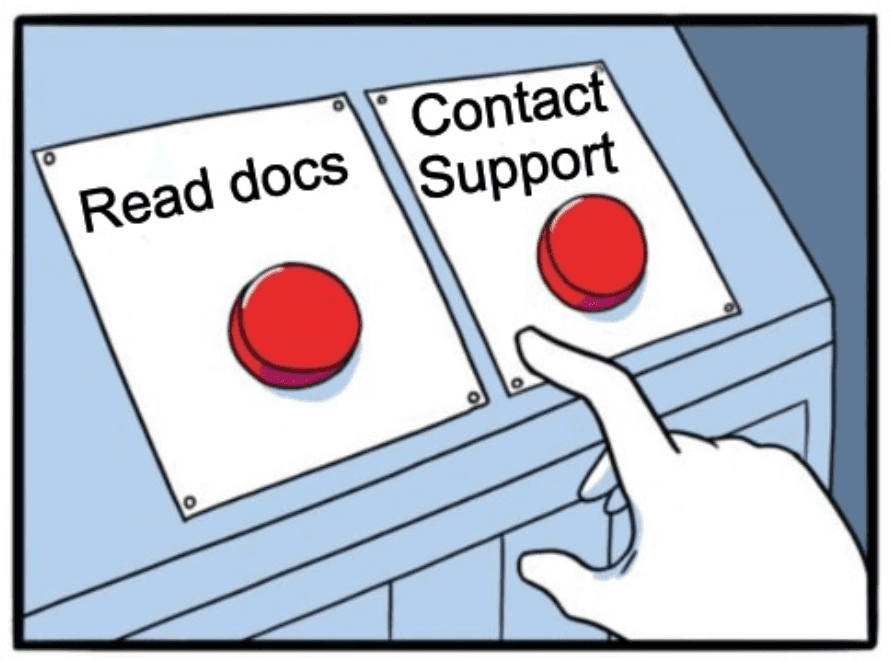
The anatomy of a great generated article
Here’s the structure I’d require every time. No exceptions.
Goal
What good looks like:
States the end state in testable terms: “You will have X enabled and visible in Y.”
States who it applies to (roles, plans, platforms).
States when not to use it. Intercom emphasizes being clear on the objective and matching the article type to the job.
Bad goal: “Learn how to use dashboards.”
Good goal: “By the end, you will create a dashboard and share it with your team.”
Prerequisites
What good looks like:
Role, plan, feature flags
Inputs required (API key, CSV, domain)
Starting state (what must already exist)
“Where to verify” access
If the generator can’t confirm plan gating, it should write:
“Verify your plan includes X: go to Settings → Billing → Plan details.”
That sentence saves tickets.
Steps
Steps need to be operator-grade: unambiguous, scannable, resilient.
Microsoft’s UI-writing guidance pushes for input-neutral instructions and consistent verbs.
What good looks like:
A numbered procedure with task-based subheadings
Each step starts with location, then action
Each step includes an expected result checkpoint
Example pattern (this is the money):
In Settings → Notifications, select Email alerts.
Expected result: Email alerts shows as “On.”
That “expected result” line is not fluff. It’s a built-in self-check that prevents silent failure and reduces “I did it but nothing happened” tickets.
Notes and edge cases
Notes exist to stop tickets, not to show off knowledge.
What good looks like:
Platform differences (web vs mobile)
Role differences (admin-only buttons)
UI variations by feature flag
Hard limits (rate limits, max file sizes)
Keep it tight. If a note doesn’t prevent confusion or failure, delete it.
Troubleshooting
This is where AI drafts usually faceplant.
NN/g’s guidance on error messages boils down to: make errors visible, clear, and constructive. That mindset applies directly to troubleshooting sections.
What good looks like:
Symptom → likely cause → fix → how to confirm
Exact error text when possible
Top 3 failure modes based on tickets, logs, or macros (not imagination)
Example:
Symptom: “You don’t have permission to perform this action.”
Likely cause: You’re a member, not an admin.
Fix: Ask an admin to grant the “Manage integrations” permission in Settings → Team → Roles.
Confirm: Refresh the page and check the Integrations menu appears.
That’s support-grade. Anything else is a shrug.
FAQs
FAQs should reduce branching, not dump leftovers.
Intercom separates FAQs from how-to and troubleshooting for a reason. Different jobs, different shapes.
Good FAQs are high-frequency questions that don’t fit cleanly in the flow, like “Does this work on mobile?” or “Can I undo this?”
A 60-second rubric for reviewing generated help articles
If your team can’t evaluate an AI draft quickly, you’ll never ship consistently.
Here’s a rubric I’ve used to keep reviews fast and brutal:
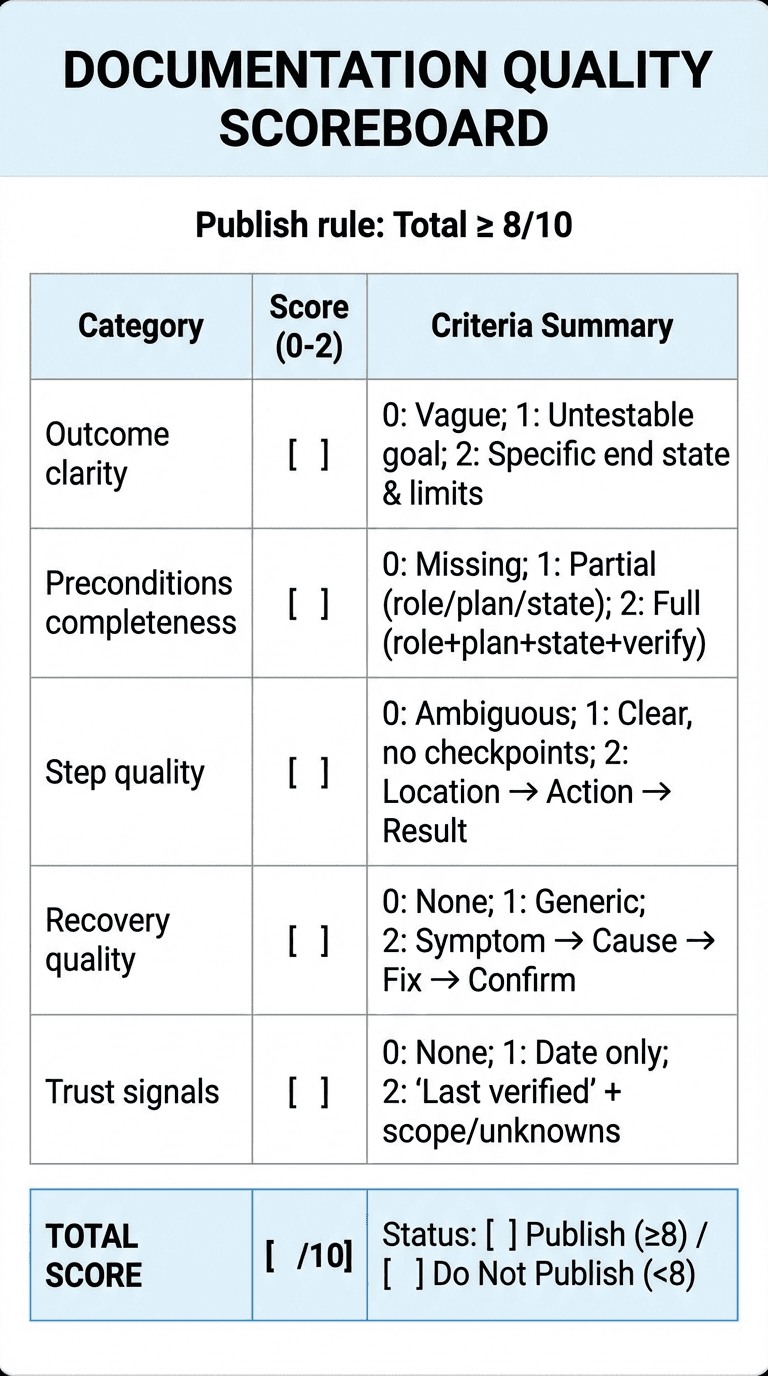
Score each 0 to 2. Publish only if total ≥ 8/10.
Outcome clarity
0: vague goal
1: goal exists but not testable
2: specific end state + scope limits
Preconditions completeness
0: missing prerequisites
1: partial (role OR plan OR starting state)
2: role + plan + starting state + where to verify
Step quality
0: ambiguous steps (“go to,” “click the thing”)
1: mostly clear, missing checkpoints
2: location → action → expected result consistently
Recovery quality
0: no troubleshooting
1: generic troubleshooting
2: symptom → cause → fix → confirm, tied to real failures
Trust signals
0: no freshness indicators
1: date only
2: “Last verified” + scope notes (platform/role) + known unknowns
What the generator must infer and what it must refuse to guess
A help center article generator should infer what it can from real signals:
user intent and task boundaries
stable UI elements
required permissions when observable
state transitions (“after you save, you’ll see X”)
But it must not guess:
plan gating
security implications
irreversible actions
anything it can’t ground in product reality
My favorite pattern here is what I call the known-unknowns block:
“If you don’t see X, verify Y. If Y is true and X still doesn’t appear, contact support and include screenshot Z.”
It’s humble, but it’s useful. And it stops the generator from hallucinating.

Production reality: consistency beats writing flair
You don’t maintain documentation. You maintain a living map of a product that won’t sit still.
Help Scout talks about the knowledge base as the backbone of self-service, and the implication is obvious: if the backbone gets stale, everything hurts.
So make maintainability a requirement:
Separate core intent from brittle UI labels when you can
Add a freshness workflow: “Last verified on YYYY-MM-DD”
Track “UI change risk” per article (high-risk pages get reviewed every release)
This is also why we built Clevera to start from what’s hardest to fake: the real workflow. Clevera turns a screen recording into a step-by-step article with relevant screenshots, then lets you edit it in a Notion-like editor and export to platforms like Zendesk or Intercom.
If your product ships fast, that “record once, generate, edit, export” loop matters more than perfect prose.
Contextual CTA: If you want the generator to output consistent structure every time, start with Clevera’s documentation workflow (/features/docs) and pair it with a matching video tutorial version at the top of the article (/features/video-tutorials).
QA gates before you publish (so customers don’t QA for you)
AI drafts deserve the same publishing discipline as human drafts. Maybe more.
Here are the gates I’d enforce:
Gate 1: the “try it cold” test
Hand the draft to someone who did not build the feature.
If they can’t complete it in one pass, the article fails. No debate.
Gate 2: the procedure format check
Google’s style guide has specific guidance on procedures and even single-step formatting. Use it as your baseline.
Checklist:
numbered steps for multi-step tasks
one action per step
consistent verbs
no hidden branching inside steps
Gate 3: troubleshooting must map to reality
Every troubleshooting item must map to:
a ticket tag category, or
a support macro, or
an error log pattern
If you can’t tie it to reality, cut it.
Gate 4: sentence case headings for scannability
This sounds small, but consistency reduces cognitive load.
Even Google’s style guide explicitly recommends sentence case for headings and titles.
Gate 5: freshness and scope labels
Add:
updated date
platform
role
“last verified” (internal is fine)
Common failure modes I see in auto-written help content
If you want to prevent pain, watch for these:
Steps without checkpoints (leads to silent failure)
Prerequisites that dodge the hard parts (plan, permissions, starting state)
One-size-fits-all flows (admin and member paths mashed together)
Troubleshooting that apologizes instead of fixing
Screenshot spam (screenshots can’t rescue unclear instructions)
Screenshots help, but only when they’re pointed. If you include visuals, annotate them: arrows, boxes, step numbers.
Where Clevera fits when you actually care about quality
If your help center article generator starts from text prompts alone, it’s guessing about UI reality.
Clevera starts from the workflow itself: you record the task, then Clevera produces a polished video and a detailed article with screenshots and editable structure, so updates take minutes instead of a week-long writing sprint.

That matters for teams shipping weekly UI changes, with limited writing bandwidth, and multiple contributors trying not to step on each other’s toes.
If you want to go deeper on this topic, these related posts belong next in your reading queue:
How to turn screen recording to documentation without messy cleanup
AI documentation generator workflows for fast-moving product teams
Quick FAQs (the non-zombie version)
What sections should a help center article generator include every time?
Goal, prerequisites, numbered steps with expected results, scoped notes, troubleshooting (symptom → cause → fix → confirm), and a small FAQ for high-frequency branch questions.
Can a help center article generator really reduce support tickets?
Yes, if it optimizes for low ambiguity and includes real troubleshooting. If it only rewrites prose, it might even increase tickets by creating false confidence.
How do you write prerequisites for different roles and plan tiers?
State the role and plan up front, add “where to verify” checks, and split the flow when admin vs member screens differ. Never let the generator guess plan gating.
What’s the fastest QA method for AI-generated help articles?
Run the 60-second rubric, then do a “try it cold” test with a non-expert. If they hesitate or improvise, rewrite until the steps are executable.
Should AI-generated articles include screenshots?
Yes, but only with annotation and only where visuals remove ambiguity. Screenshots don’t compensate for unclear steps.
Your challenge
Pick one of your top 10 ticket drivers and run it through the rubric above.
If the article scores under 8/10, don’t rewrite the intro. Fix the prerequisites, add checkpoints, and write real troubleshooting tied to real failures.
Then watch what happens to ticket volume over the next release cycle.