AI onboarding video software: cut time-to-value without a video team
Jan 7, 2026

Last quarter, a PMM I know shipped a beautiful onboarding video.
It was polished. It was branded. It had that “someone definitely used After Effects” vibe.
Then the product team moved one button.
Now the video is a liar.
Support tickets crept up. New users hesitated at the exact step the video “helped” with. And the kicker: the team still celebrated “onboarding completion” going up.
That’s how you end up with onboarding that looks healthy on slides… while time to value drags like a shopping cart with one broken wheel.
This is why we think about ai onboarding video software differently. It’s not about fancy transitions. It’s about getting users to their first meaningful outcome faster, using onboarding videos that stay current without needing a video team.
What is AI onboarding video software?
AI onboarding video software is a tool that turns product knowledge into short, contextual onboarding videos quickly, so users reach their first meaningful outcome faster. It typically automates scripting, narration, editing, and updates, letting SaaS teams reduce time-to-value without relying on a dedicated video production workflow.
Time-to-value is the only onboarding metric that doesn’t lie
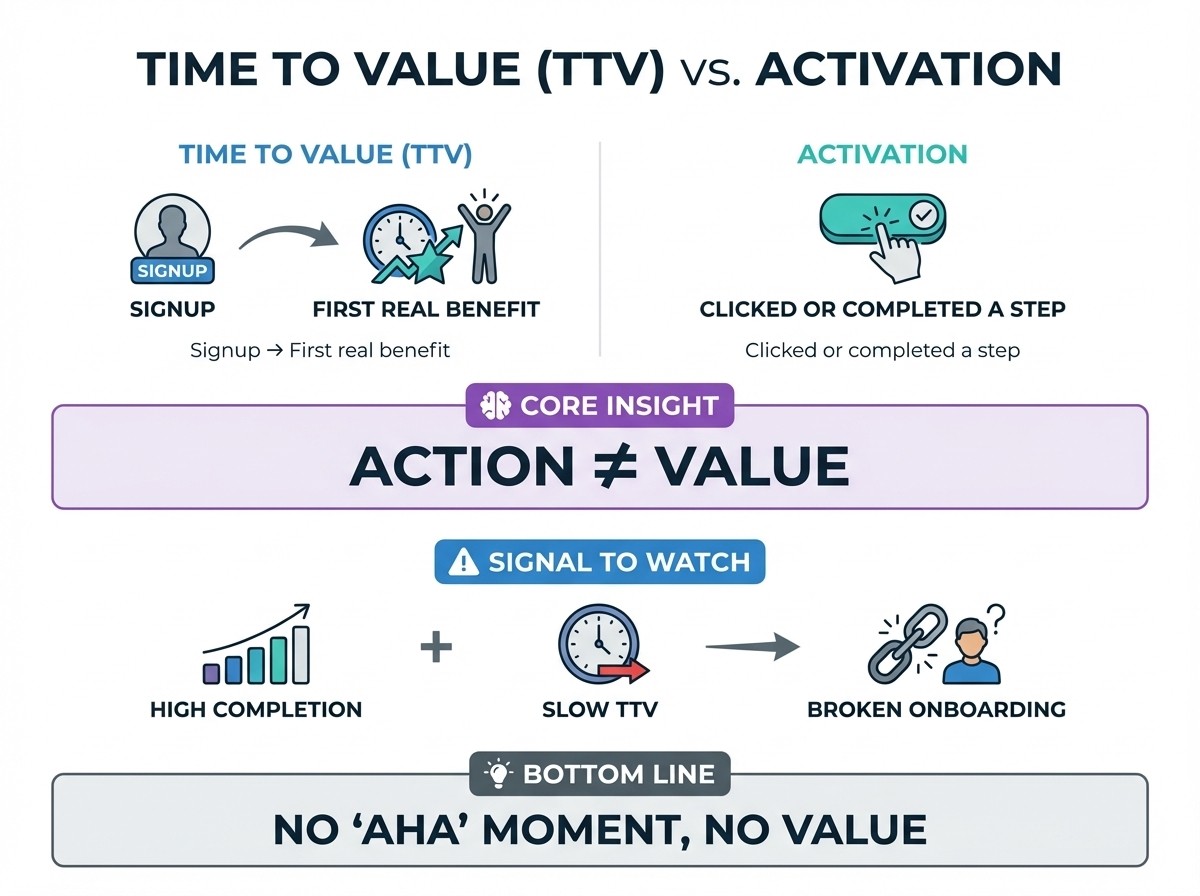
Userpilot defines time to value (TTV) as the time from signup to a user’s first meaningful outcome.
Here’s the trap: teams confuse activation with value.
Amplitude puts it cleanly: time to activation measures completing a key action, while time to value measures when users actually feel the benefit.
My blunt take: onboarding completion is a vanity metric if TTV stays slow.
If your onboarding checklist hits 90% completion but users still don’t get the “why this matters” moment, you didn’t onboard them. You marched them through a museum!
SaaS onboarding best practices that shorten time to value (not just “activation”)
If your goal is faster TTV, your onboarding needs to behave like a shortcut, not a tour guide.
The best SaaS onboarding best practices I see in high-performing teams look like this:
Pick one “value event” and obsess over it.
Contentsquare frames time-to-first-value (TTFV) as the time from signup to the activation event that signals the “aha” moment.Remove ambiguity at the exact point of friction.
Not “visit the help center,” but “here’s the 22-second clip inside the empty state.”Design for skimmers and watchers.
Video builds confidence. Text gives copy/paste speed. Pair them.
If you want low-touch onboarding, keep help available. ProductLed warns low-touch should not mean “hard to reach a human.”

Where onboarding videos actually move metrics in a PLG funnel
First: A PLG funnel stands for Product-Led Growth funnel.
Most posts say “add onboarding videos” and wave vaguely at retention.
Here’s the map I’d actually use:
PLG moment | Video that works | Why it moves the metric | Metric to watch |
|---|---|---|---|
Pre-signup | 45s “first win” preview | Reduces expectation mismatch | Conversion rate, demo-to-signup |
First session | Micro-video at the stuck point | Turns confusion into action | Time to activation, TTFV |
Day 1–7 | Role-based “next win” videos | Makes adoption feel guided, not random | Feature adoption, p90 TTFV |
Support deflection | Troubleshooting micro-videos | Vidyard calls these a first layer of support | Ticket volume by topic (vidyard.com) |
Expansion | “New feature in 60 seconds” | Converts releases into usage | Feature adoption, expansion events |
The real enemy: onboarding content debt
Most SaaS teams don’t lack onboarding ideas.
They lack a repeatable content supply chain.
So videos rot:
UI changes make yesterday’s walkthrough misleading.
Production feels expensive, so updates get postponed.
Your help center becomes a thrift shop: some gems, lots of junk, nobody trusts it.
That’s onboarding content debt. And it taxes TTV every day you ignore it.
This is exactly why we built Clevera to make updates cheap enough to do casually. Record once, let AI script and narrate, and keep the asset live across embeds so edits propagate without link-swapping.
If you want the deeper “why this gets expensive fast,” our post on the hidden cost of manual tutorial production breaks the math down.

A practical method: build a time-to-first-value map, then design videos around it
Here’s the workflow I’d run with a CS leader and a PM in a 60-minute session.
1) Pick one value event (the “aha”) and instrument it
Use a single event that clearly signals value, not “clicked around.”
TTFV is literally defined as time between signup and completion of the activation event.
2) Find the 3 biggest drop-offs before that event
Look for “where users stall,” not “where users bounce.” Stalling is where micro-video wins.
3) Create one micro-video per drop-off step
Keep each one brutally focused. One screen. One job.
4) Place each video at the point of friction
Not a generic “Getting started” page.
empty state
integration screen
permissions page
settings that block progress
5) Measure impact like an adult
Track these metric vigorously:
median and TTFV/TTV (not just averages)
activation rate (separately)
ticket volume for that exact topic
Pro tip: keep a “video rot budget.”
Every month, allocate 90 minutes to refresh the top 5 videos tied to revenue-critical flows (trial activation, integrations, billing, permissions, exports). Treat it like paying down interest before it compounds.
Onboarding videos that work (and the ones that waste everyone’s time)
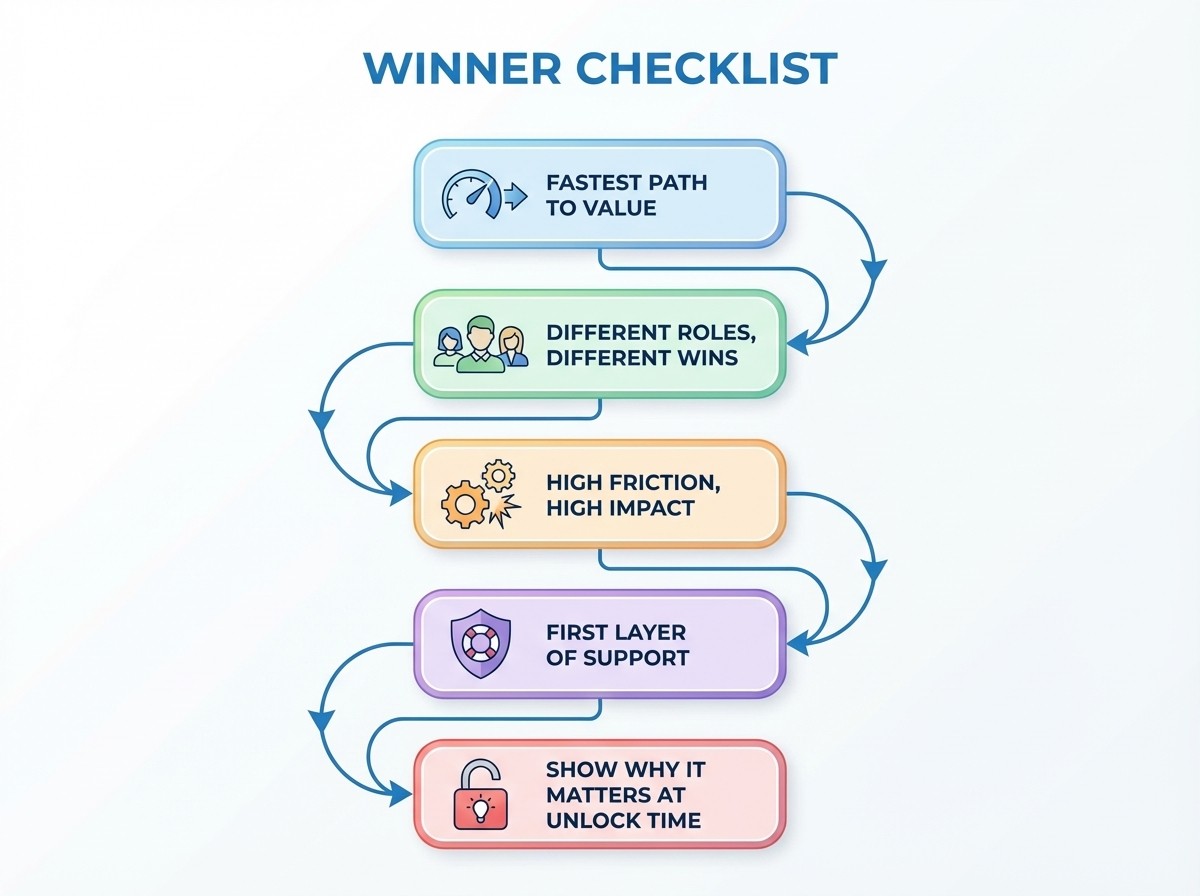
The winners (job-first)
First win video: fastest path to “I got value.”
Role-based quickstarts: same product, different success definition.
Integration setup clips: highest rage-click potential, biggest TTV impact.
FAQ and troubleshooting micro-videos: Vidyard explicitly positions these as support’s first layer.
Feature discovery demos: show “why it matters” right when a user unlocks it.
The losers (tour-first)
Red flags
6-minute “here’s every tab” tours
videos that start with a logo sting and mood music
“click here, then here, then here” with no why
Green lights
30–60 seconds
one job, one outcome
ends with “you’ll know it worked when…”
Learning science, but make it useful
You don’t need a PhD to make better onboarding videos.
Just steal these principles:
Segment the content. Short chunks reduce cognitive load and help people follow steps without getting lost. (teaching-resources.delta.ncsu.edu)
Show, then let them do. Video is the primer. The product is the practice field.
Bake in captions by default. Wistia reports captions are the top accessibility feature users add, and caption usage has risen sharply since 2021.
A mini dashboard a CS or PMM leader can actually run
If you want to prove ROI without getting stuck in “video views are up” nonsense:
TTFV/TTV: median and p90 () Median shows the typical experience. p90 exposes long-tail friction.
Topic-level ticket rate: tag tickets by issue, compare before/after Measure per friction point. The right video should reduce tickets fast.
Ticket deflection: reduction via self-serve resources () Track by topic, not globally.
Watch-to-action rate: % who watched then completed the intended in-app event Views only matter if they lead to action.
Experiments you can run this week
Pick one friction point and run a simple experiment. Test embed placement such as modal versus inline versus help-center-only. Compare a short first-win clip against a longer walkthrough. Try role-based branching after persona selection. Trigger a video after repeated failed attempts or inactivity. Pair video with text so both watchers and skimmers can move forward.
FAQ: quick answers buyers actually ask
Can AI onboarding video software replace a CSM-led onboarding motion?
No, and it shouldn’t. Use it to automate repeatable explanations so humans can handle complex, high-context onboarding. ProductLed’s framing on low-touch still keeping help available is the right mental model.
How long should onboarding videos be?
Default to 30–60 seconds for micro-videos tied to a single task. Go longer only when the job truly requires it. Segmentation reduces cognitive load and improves follow-through.
Where should I place onboarding videos for the biggest time-to-value impact?
Put them where users stall: integrations, empty states, permissions, exports. Vidyard’s onboarding guidance also emphasizes task-focused tutorials and troubleshooting clips as high-impact formats.
Do captions really matter for onboarding videos?
Yes. Wistia reports captions are the most-added accessibility feature and caption usage has grown dramatically since 2021.
The kicker: ship one “first win” this week
Pick one core use case.
Map the three steps that block the first meaningful outcome.
Then create one micro onboarding video for the worst step, embed it exactly where users get stuck, and measure p90 TTFV for seven days.
If your time-to-value doesn’t move, I’ll bet you picked the wrong friction point, not the wrong format.